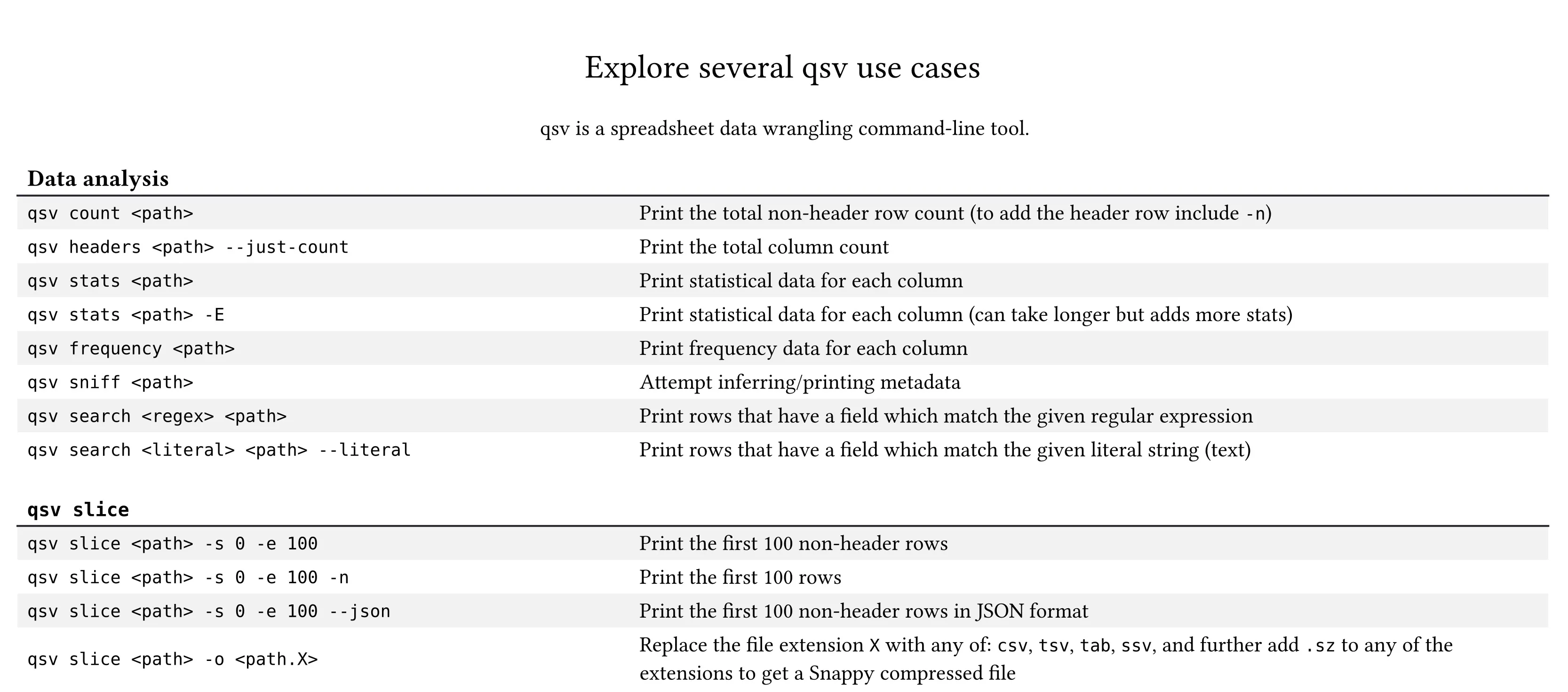
qsv cheat sheet
This post includes qsv commands you can use based on the qsv cheat sheet infographic from the wiki.
Many of these commands mention <path> which you should replace with the path to your CSV file.
Tip: If the output of a command is CSV data, pipe the command into qsv table for a (potentially) more readable format.
This post is based on qsv v3.2.0.
Row count
Return the total non-header row count.
qsv count <path>- To include the header row in the row count, add the
-nflag.
Column count
Return the total column count.
qsv headers <path> --just-countStatistics
Return statistical data for each column.
qsv stats <path>- To include more statistics (may take longer), add the
-Eflag.
Frequency
Return frequency data for each column.
qsv frequency <path>Infer metadata
Return inferenced metadata.
qsv sniff <path>Run a search query
Return rows that have a field which match the given regular expression.
qsv search <regex> <path>- To search by text instead of a regular expression, add the
--literalflag and use a literal string instead of<regex>.
Return the first
Return the first
qsv slice <path> -s 0 -e 100- To include the header row, add the
-nflag. - To output in JSON format, add the
--jsonflag. - To output to a file, add the
-o <output-path>flag and replace<output-path>with the output path.